Government Civil Servants in Cameroon usually search the web to see how they can monitor their documents online, advancements, and reclassification (Position Du Dossier).
Reasons to Monitor Documents Online
Usual problems most civil servants (state employees) in Cameroon face include;
- Monitoring the position of their Integration Documents.
- To check if their Matricule Numbers have been processed.
- Checking to see if the government has programmed them on its payroll (salary programing)
- To verify the exact amount of the salary received, usually after a payslip has been issued by Minfopra.
- To follow up on advancement and obtain advancement decisions.
- To follow up on reclassification to obtain reclassification documents (Reclassement)
The Role of Minfi and Minfopra To Civil Servants
The above functions are managed by two ministries; MINFI and MINFOPRA:
- MINFOPRA (Ministry of the Public Service and Administrative Reforms) helps the state worker monitor his/her integration documents. It also helps a government employee to know when your matricule is out.
- MINFI (Ministry of Finance) helps a civil servant be programmed for salary and relevant details on the index point or echelon changes.
The above ministries handle government personnel from all ministries in the country, such as MINSANTE (Ministry of Public Health), MINESEC, ENAM, etc.
How To Check Documents For Reclassification, Integration, or Advancement (Position Du Dossier)
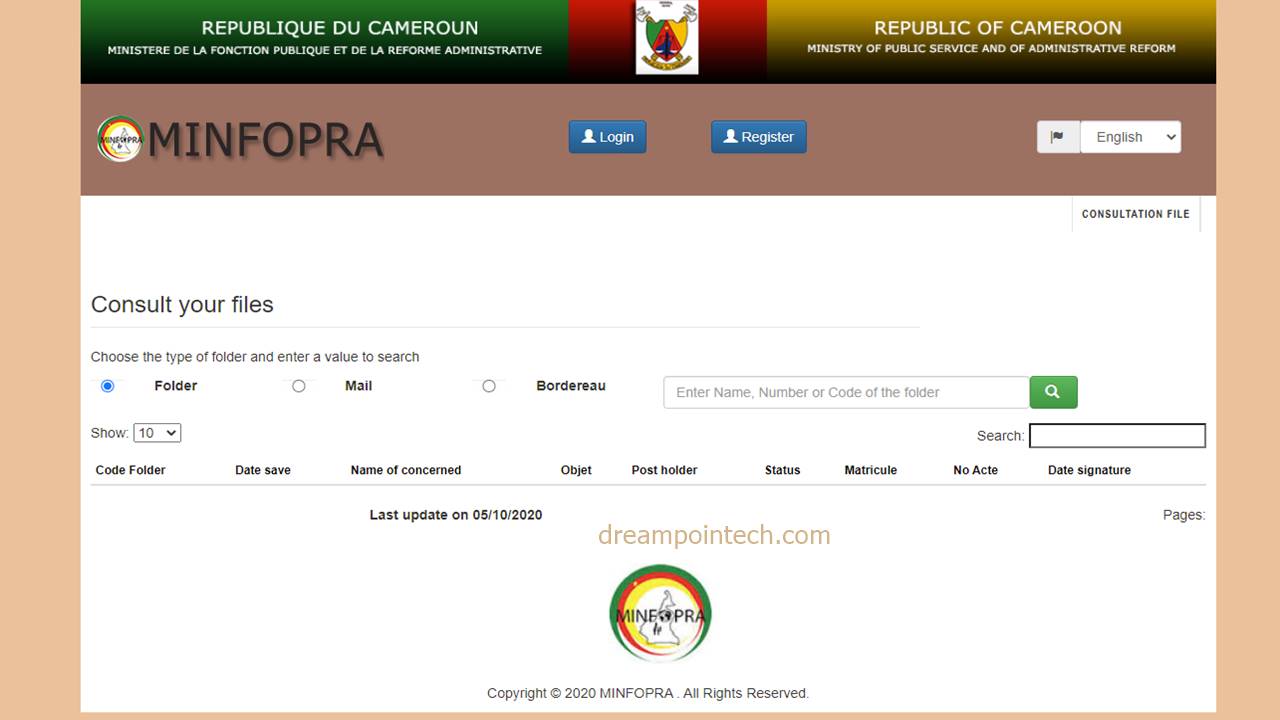
- Click on this link to go to the Official site of Minfopra.
- Tap on Register to register or log in if you already have an account. This step is optional. However, it allows you to receive alert messages when your documents make progress.
- Fill in your Full Name or Matricule Number
- Tap the ‘Enter’ key on your keyboard to begin a new search.
- A search result will show possible entries matching the keywords in your search.
- Click on ‘Voir Parcours’ to see the details of your document status. This also lets you know the state of your integration decision, advancement, or reclassification.
- Note the final state and pay attention to the office’s name or service where your file is currently being treated.
- That’s it. You have successfully followed up or monitored your public service documents online in Cameroon for free.
Conclusion
We find this government initiative to be very convenient in this digital age.
We hope you found it easy to monitor the position of your documents online. Write in the comments if you want us to help you check a particular document, and we will do our best to respond when possible.
See Also: How to Download and Print Your Payslip Online For Free.